
Installing an unsigned build
Iblis builds are not code-signed yet, so your system will warn before the first run. Here is what each warning means and how to get past it safely. Back to the downloads.
What each download is today
- Windows 11 Tauri 2 0.1.0-preview.1 Tauri 2: this is it
- macOS Electron 0.2.0-alpha.62 Tauri 2: after December 1
- Linux Tauri 2 0.1.0-preview.1 Tauri 2: this is it
First: verify the checksum
Every download lists a SHA-256 checksum. Run the command for your system in the folder you downloaded to and compare the output with the listed value. If they differ, delete the file.
- Windows (PowerShell):
Get-FileHash .\Iblis_*_x64-setup.exe -Algorithm SHA256 - macOS (Terminal):
shasum -a 256 Iblis_*_aarch64.dmg - Linux:
sha256sum Iblis_*_amd64.AppImage(or the.deb)
Windows: SmartScreen
- Run the installer. Windows shows "Windows protected your PC".
- Click More info; the publisher shows as "Unknown publisher".
- Click Run anyway, then follow the installer.
macOS: Gatekeeper
- Open the dmg and drag Iblis to Applications.
- Open Iblis. macOS says it cannot verify the developer: press Done (or Cancel).
- macOS 15 and later: System Settings, Privacy & Security, scroll to "Iblis was blocked", press Open Anyway, enter your password, then Open Anyway again.
- macOS 14: Control-click (right-click) Iblis in Applications, choose Open, then Open.
- Or in Terminal:
xattr -dr com.apple.quarantine /Applications/Iblis.app, then open it normally.
Linux: AppImage or deb
AppImage
- Make it executable:
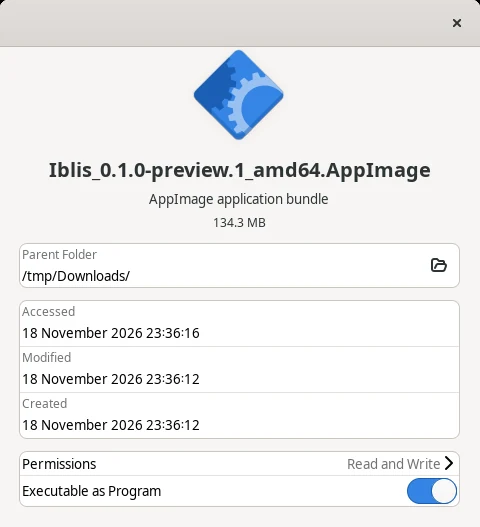
chmod +x Iblis_*_amd64.AppImage, or open the file's Properties and turn on "Executable as Program" (GNOME Files; other file managers call it "Allow executing file as program"). - Run it:
./Iblis_*_amd64.AppImage - If it says FUSE is missing, install it:
sudo apt install libfuse2(Ubuntu 22.04) orsudo apt install libfuse2t64(Ubuntu 24.04 and later).
Debian / Ubuntu package
sudo apt install ./Iblis_*_amd64.deb (the ./ makes apt install the local file and pull in its dependencies).